CBJ Fast 50 Recognition
Blue Line is once again recognized as a Charlotte Business Journal Fast 50 Award Winner! Blue Line Technologies is thrilled to announce
Blue Email compromises are at an all time high. We get one or two reports per day of potential account takeovers or suspicious activities in email accounts. Always be vigilant of suspicious activities in your email. It is also a great idea to periodically check your email rules settings. Here’s how and why.
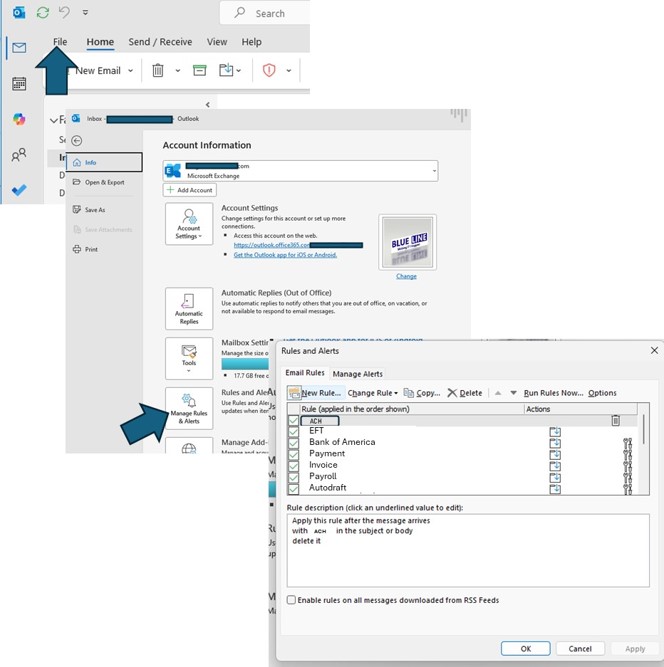
The bad guys often insert special auto-forwarding and deletion rules in mailboxes to hide their tracks. See below how to check your email rules in Outlook by selecting FILE -> MANAGE RULES AND ALERTS. In most instances, embedded rules are related to financial activities so look for language around payment methods, invoices, or transactions.
If you see any Rules that you do not recognize, contact your Blue Line Account Manager provider right away.
Blue Line is once again recognized as a Charlotte Business Journal Fast 50 Award Winner! Blue Line Technologies is thrilled to announce
Are you ready for AI? Blue Line has developed a Readiness Assessment Survey that will help prioritize the steps to ready your
09/15 – Blue Line participated in the Fall 2025 NC State Computer Science Program Career Fair, meeting hundreds of upcoming graduates to